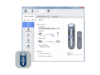
rec-mic-desktop-dictation-hero

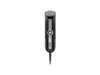
RECMIC II RM Series – Desktop Dictation Microphone

Intelligent and flexible USB microphones designed for accurate results with speech recognition — even in noisy environments


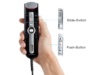
  • Simple control with push button or slide switch
  • Antimicrobial and antibacterial coating
  • Speech-recognition ready – compatible with the world’s leading speech recognition packages
Breadcrumb Navigation

Every detail of the RecMic II is engineered to make dictation faster, clearer, and more reliable, whether at a desk or in hands-free mode.

  • Ergonomic Design – Smooth UV coating and intuitive controls for comfortable use
  • Silent Buttons – to minimize handling noise
  • Trackball & Navigation Buttons – Streamline workflow for transcription
  • Hands-Free Stand Detection – Automatically switches to stand mode
  • recmic-4010n-hero

    RM-4010N

    • Intelligent 2 microphone system
    • Operation: Push button
    • Intelligent Modes for Quiet and Noisy Environments
    • Conference/Meeting Mode
    • Dictation File Encryption (256Bit AES)
    • Antimicrobial surface


    Learn more about REC MIC II RM-4010N

  • rec-mic-4110n-hero

    RM-4110N

    • Intelligent 2 microphone system.
    • Operation: Slide-switch operation
    • Intelligent Modes for Quiet and Noisy Environments
    • Conference/Meeting Mode
    • Dictation File Encryption (256Bit AES)
    • Antimicrobial surface


    Learn more about REC-MIC II RM 4110N

RECMIC II – Microphones designed for speech recognition

Actively monitors and analyses the audio difference. High directionality ensure quality recording in noisy environments.

rec-mic-intelligent-microphones

The sound studio shock mounting reduces touch noise from your hand to the device body. The microphone housing features a triple layered popfilter

rec-mic-low-noise-pop-filter

Button noise is eliminated from the recording, ensuring clean and clear audio

rec-mic-mouse-trackball-noise-suppression
rec-mic-intelligent-microphones
rec-mic-low-noise-pop-filter
rec-mic-mouse-trackball-noise-suppression
recmic-button-control

Intuitive Push Button or Slide Switch Control

Navigate effortlessly with your choice of push buttons or slide switch. Designed for smooth, precise, and intuitive operation.

  • rec-mic-hygiene-antimicrobial-antibacterial

    Antimicrobial & Antibacterial Protection

    Designed for hygiene-critical environments, OM SYSTEM microphones are tested to the ISO 22196 standard, reducing microbes on the surface by over 99.5%. The alcohol-wipe-resistant housing allows safe, effective cleaning and disinfection.

  • rec-mic-hands-free-accelerometer

    Seamless Hands-On and Hands-Free Dictation

    The RecMic II gives you the flexibility to switch between hands-on and hands-free dictation with ease. Its built-in accelerometer automatically activates hands-free mode when placed in the stand and seamlessly adjusts to wide-directional recording to ensure clear, accurate audio with no manual settings required.

Operating Modes and Compatibility

The RecMic II Series offers a seamless plug-and-play experience, compatible with popular speech recognition software without additional installations. Simply select the mode that best fits your needs and environment.

Simply connect the RecMic II to your Dragon Software – no extra installation needed. The device instantly recognizes Dragon Mode, with all buttons pre-configured for immediate use.

Connect the RecMic II to your Windows PC without needing additional software. If your Windows version includes the Speech Recognition Engine, the device can be used with a pre-defined button setting.

Assign individual shortcuts to control software applications through keyboard shortcuts. Organizations using virtual environments benefit from HID keyboard mode, which requires no special driver installations. Configure settings with the RecMic Configuration Tool (RCT) software.

ODMS R8 On-Premise solutions provide a complete platform for managing workflows from dictation to transcription. With a user-friendly interface and robust data security, it ensures a smooth and efficient experience.


 

Find out more

rec-mic-configuration-tool

RecMic Configuration Tool (RCT)


  • Configure and Assign Functions

With the RCT, you can configure RecMic settings and assign functions that control applications.

The application is free and can be downloaded from each local OM SYSTEM Websites.


  • Features supported by tool

The tool supports Device configuration, Application Control, Keyboard Templates


Download – RCT

odms-r8-on-premise-dictation-transcription-software-hp

Enhance Your Workflow with ODMS R8

Discover the full potential of your RECMIC microphone with ODMS R8, the powerful on-premise dictation management software.

Streamline recording, editing, and file organization, and enjoy seamless integration with RECMIC for efficient, professional dictation.

Find out more